








When the Clock Stops is a browser-based game where you navigate time-frozen environments using keyboard movement and mouse controls—it works best on desktop because the gameplay relies on quick turning and precise mouse capture.
You’ll find specifics on controls, core gameplay loops, and the most useful mechanics that make When the Clock Stops work, with everything focused on getting you playing efficiently rather than explaining backstory or theme.
When the Clock Stops online
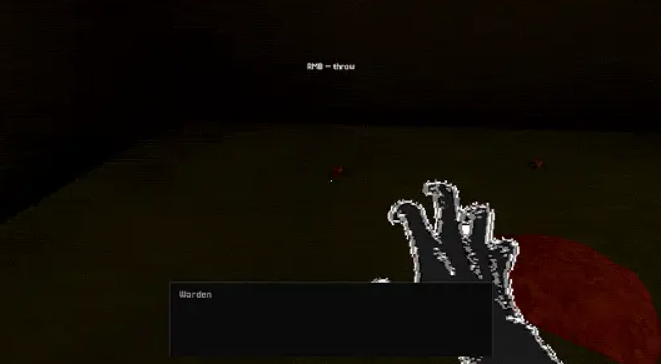
When the Clock Stops is a first-person survival horror game built around a simple loop: collect insects in sealed basement, feed the creature beneath the floor, and buy upgrades before the next deadline. The clock ticks while you search. When it stops, the floor opens and something below expects payment. That pressure turns a small, dim room into a tense resource puzzle where every trip away from the feeding spot becomes a risk.
Press Play to open the browser build. Desktop is recommended because the game depends on keyboard movement, mouse capture, and fast turns.
Click inside the game window after it loads to capture input. Fullscreen can help with cursor containment and readability.
How to Play When the Clock Stops
Your goal is to gather insects and return them to the pit before each cycle ends. The clock decides when the safe phase is over. While it ticks, you can explore. Once it stops, the floor opens and you either feed the creature or face the consequence.
Controls:
- Move: W, A, S, D
- Jump: Space
- Catch or pick up: Left Click
- Throw: Right Click
- Crouch: C
- Pause: Esc
Core strategy:
-
Learn a short route. Check darker corners for insects, but keep a clear path back to the feeding spot. Long trips cost more time than they seem.
-
Catch food early. Small, reliable hauls are safer than waiting for one perfect collection near the end of a cycle.
-
Return before the ticking ends. Getting caught across the room when the floor opens can end a run quickly.
-
Throw only when it saves time. Right Click lets you place food faster, but a missed throw wastes the insect and the seconds you needed.
-
Use upgrades for breathing room. Spend what you earn to slow the clock and extend later cycles. Upgrades do not remove the threat, but they give you more time to search and recover from mistakes.
The horror comes from the tradeoff. A corner may hold enough insects to buy another cycle, but it may also cost the seconds you needed to return. Good runs come from learning how far you can push each cycle before greed becomes a liability.
Browser play Tips
If the build does not respond, try these fixes:
- Player will not move: Click the game window to capture the mouse and keyboard.
- Cursor feels trapped: Press Esc, then click back into the game. Fullscreen may also help.
- Black screen or failed load: Refresh the page and check that the browser is not blocking scripts.
- Stuttering: Close extra tabs or background apps, then restart the run.
Performance can vary by browser, device, and graphics settings, especially during the first moments after the game opens. Mobile devices may load the page, but touch controls are awkward for movement, quick turns, and catching insects.
Related Games
- Anomalous Coffee Machine 2 — Its unsettling first-person horror setup and experimentation-driven danger make it a fitting follow-up for players drawn to the basement’s oppressive atmosphere and deadly resource decisions.
What makes When the Clock Stops work?
The clock is more than a timer. It structures the entire loop: while it ticks, you make decisions. Once it stops, those decisions get tested. If you chase every insect, you may be too far when the floor opens. If you stay too close to the pit, you may not collect enough.
The PSX-style presentation reinforces the tension. Low light, rough edges, heavy audio, and close walls make the basement feel physical and hostile. The game does not need a complicated control scheme to feel stressful—only a clock, a floor, and something hungry below you.
Share your tips for When The Clock Stops
Share a useful route, a memorable ending, or a correction that can help the next player.
Comments are not collected on this independent fan site.
To report a broken game frame or suggest a guide correction, email [email protected] with the page URL.